Due to the recent updates, Facebook has changed how it
interacts with applications such as FarmVille. In order to give people more control about the information they share with apps, Facebook has removed the permission for apps
to view player’s friends list thus resulting to
neighbors missing from player’s ladder and crafting cottages or friends missing from the list when sending gifts and requests.
As a possible workaround for the blank Trading Post and list of neighbors to send/request gifts, players will need to give their permission in order for the app to access their list of Friends. Just the same, players’ friends will have to grant permission as well.
To help you check if you have granted the permission or not, you may follow the steps below:
1. From your Facebook Home Page, click the down arrow and select Settings.

2. Select
Apps on the left side and look for
FarmVille.

3. Hover on
FarmVille and click the pencil icon to
Edit Settings.
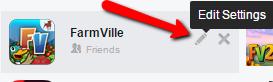
4. Make sure that
‘Friend list’ is present and enabled.

If the option for Friend list is missing, you will need to uninstall and reinstall the game. To uninstall the game, you may follow the steps from this
link.
Important note: Uninstalling the game will cancel active VIP subscriptions. Please make sure to go to your Facebook Settings, go to Payments, and activate your payment for FarmVille’s VIP subscription again.
If you are still missing some of your friends even after confirming that permission has been granted, you may share this link to your friends to ensure that they will do the same.
_-_-_-_-_-_-_-_-_-_-_-_-_-_-_-_-_-_-
FarmVille Game GUIDE