Whether this is your first time playing or you’re an avid Internet gamer, it’s important to find the right browser to ensure that FarmVille is working properly!
Below is a short guide on how you can download, install and update your browsers. If you’re using something other than the suggested browsers, this may result in sub-par performance while playing FarmVille.
Keeping your software up-to-date will ensure that your computer and games run properly.
How to download and install
If you’re using a PC running Windows, you probably already have Internet Explorer installed. If you don’t have it on your computer, you can follow this guide to download it.
1. Open a browser and go to this
website.
2. Click "Get Internet Explorer".
3. You can uncheck "I would also like Bing and MSN defaults" if you don’t want that feature.
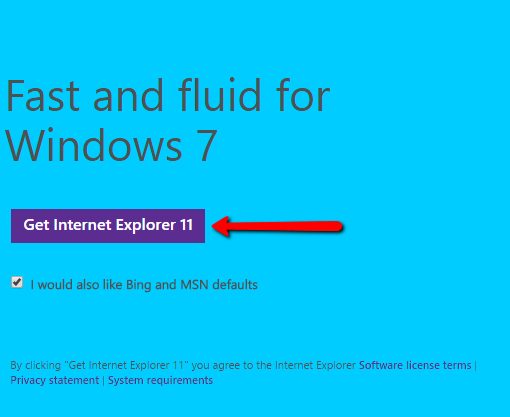
4. Once the download is complete run the downloaded file.
5. It will download all the necessary file to install Internet Explorer in your computer.
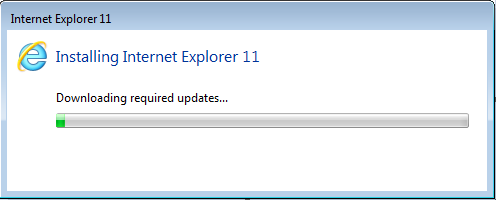
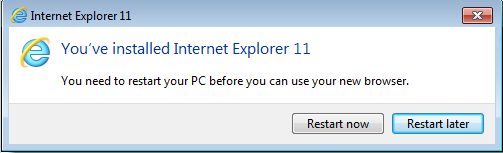
6. Once all the required files are downloaded and installed, you’ll need to restart your computer.
How to update
If you’ve agreed to receive automatic upgrades to Internet Explorer, the latest version of the browser for your operating system will be installed by Windows Update when it’s available. If not, you can follow this guide:
1. Open Internet Explorer.
2. Click the gear
 icon on the top right part of the page.
3. Click
"About Internet Explorer".
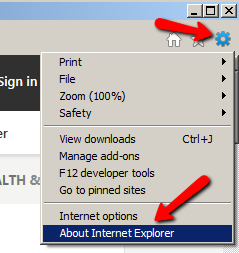
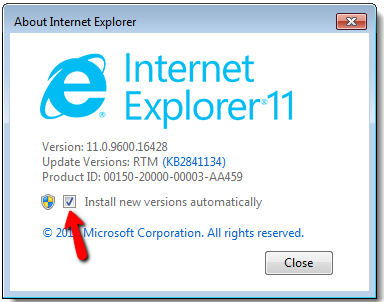
4. On the About Internet Explorer window, tick the checkbox beside "Install new versions automatically".
_-_-_-_-_-_-_-_-_-_-_-_-_-_-_-_-_-_-
FarmVille Game GUIDE