First of all, we need to differentiate the task provider. Currently, we can either do Tasks or Surveys.
Who provides the tasks in the ‘Freebies Island’?
We have 2 third-Party providers currently providing tasks in-game:
1.- Tasks: IronSource provides our video-ads and game-related tasks in the ‘Freebies Island’.2.- Surveys: TapResearch provides the surveys in our Freebies Island.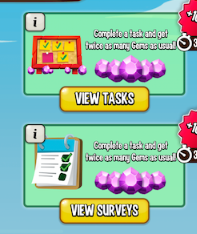 _______________________________________________________________________________
1.- Tasks
Q: How can I check my progress on my task?
A: If you head over to the task section you can see the status of all your started tasks within the “In Progress” tab. If you have started the task, it will be clearly indicated whether it’s either “Started” or “Complete”
Q: I completed my task, but it is still marked as “In Progress”, what do I do?
A: You will need to get in touch directly with either IronSource or TapResearch depending on the task.
- Enter Iron Source’s Offer Wall.
- Press the ‘missing Gems’ link on the bottom left corner of the Offer Wall.
- Follow the instructions.
- In case that Gems are still missing, fill out all necessary information.[Please note that the ticket must be composed of a minimum of 50 characters].
- Attach a proof (preferably a complete screenshot) which confirms you have completed the offer. Make sure that the date is visible.
- Click "Submit Ticket."
Q: I completed a task and it is marked as completed, but I did not receive the reward, what do I do?
A: You will need to get in touch with the IronSource customer support team. They should be able to guide help you out. Please note they will not be able to offer any assistance if your task is still marked as “Started” and your ticket will be rejected.When contacting support, what proof do I need to provide?You will need to provide them with the following proof:
- The name of the game you completed the task on
- The amount of gems advertised as the reward
- A screenshot of your task status (if possible)
- A screenshot including proof of completion:
- If the task required in-game actions, include a screenshot where the completed task requirement is visible (like reaching a certain stage or level)
- If the task required in-game purchases, a receipt or proof of purchase is required.
Please note that sometimes proof alone is not sufficient. Only completions that are approved by the advertiser will be rewarded.
Q: I completed several tasks in the same game, but only received 1 task reward.
A: Important! You may be rewarded only ONCE for each task you complete.As they already show before starting a Task, the task is valid ONLY for NEW users. If you have already completed a task once, you won’t be eligible for a second-time reward even thou the task may be shown as “available task” on your list.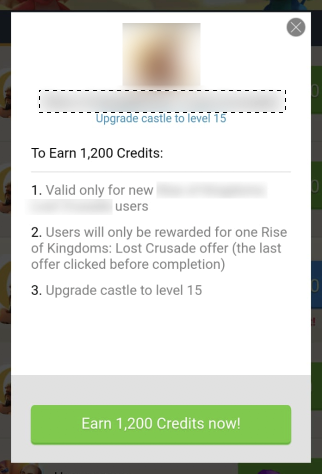 Remember that you will be rewarded for ONE TASK ONLY. Notice that if your very 1st install is attributed to our Tasks – Freebies Island, you will be rewarded once you have completed the required task. But, let us insist, only 1 time: Redoing a task that you already completed in the past (even thou it may be shown as available again on your Tasks List) it won’t count as a valid task and you won’t receive the rewards._______________________________________________________________________________
2.- Surveys
Q: How do I know if I received my Reward?
A: When you have successfully completed a survey, you will be shown a screen to say thanks. You will then be instructed to return to Dragon City and restart the game, once you are back to the Islands, your Reward will be there.So, remember to follow these steps:
- Complete a Survey
- Return to Dragon City
- You should obtain your Reward when you next login. Please keep in mind that it may take up to 2 days.
Q: I didn’t get my Reward, what do I do?
A: If for any reason you do not receive your Reward after seeing this screen, please contact their support team -> https://www.tapresearch.com/ops/support.Fill in the Form and then press submit:
Q: Why are there no available surveys?
A: Remember that TapResearch currently only supports the following countries: USA, Canada, Great Britain, Brazil, France, Germany, Australia, China, Italy, Spain, Japan, India, Mexico, Sweden, Denmark, Norway, Finland, Hong Kong, Singapore, Netherlands and South Korea.NOTE: Occasionally, there can be no available surveys or offers that you are a match for. We encourage you to check back frequently as our offers are always changing!Check their FAQ page HERE
_-_-_-_-_-_-_-_-_-_-_-_-_-_-_-_-_-_-
ドラゴンシティ Dragon City Game GUIDE