After Love Nikki-Dress UP Queen was updated, there was a situation where player feedback could not be downloaded or the user could not log in. After the research and discussion of the program, the buddies who are still unable to install or log in the game can refer to the following methods to try to solve it. problem.
Problem 1: Unable to log in
“ Network connection failed ” and other issues that cannot be logged in, preferred to ensure that your game version number is v1.4.1 ( The upper left corner of the game login interface can be viewed), if the version number is still not landing, please replace the network (such as wifi for 3G/4G, etc.) and then try to log in, operation and maintenance has been in communication with the network operator in the fault area, Will help you to restore as soon as possible ~! Please understand and patiently wait!
Problem two: Can not be installed
First of all, the Android device is divided into: internal storage space and Two blocks of external storage space
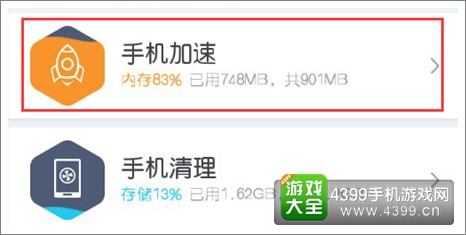
1. The internal storage space refers to the mobile phone memory (different models may be called different). The actual mobile phone memory will also be partitioned, which is more complicated. storage of phone.
As shown in the above figure, the red mark indicates the memory, and the available memory must be above 800 MB to be installed normally.
2. The external storage space refers to an SD card or other memory card.
Please be sure to apply the following classification to find a solution that suits your situation. :
▍ I. Prompt for installation “Insufficient internal storage space ”
:
Please uninstall unusable software or transfer the software to an external storage (SD card) to ensure that the device’s internal storage space is 800 MB or more.

▍ II. Prompt “ Application Not Installed ”
Solution one, Please delete the old version of Love Nikki-Dress UP Queen and install the package to re-download and install try, try the preferred installation location is set to system space priority, the premise is still to ensure that the equipment “inside Storage space ” 800MB or more free space
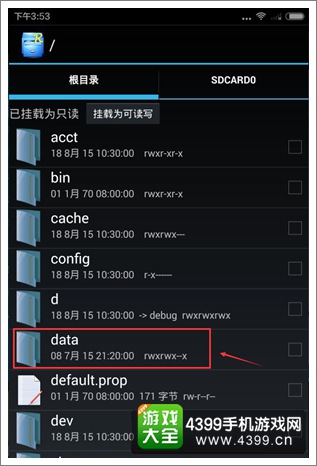
Solution two For players who have “ application not installed ” problem, if the technology Support, strongly recommend root, root, download an application named “Root Explorer” (Baidu search), enter this application to view the “root directory” to find “data” folder, enter “data” After the folder, select “ldvik-cache” folder to remove
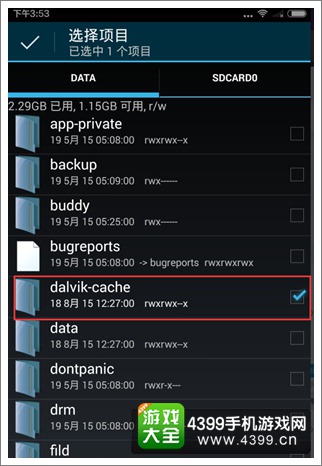
Then try to install the game, you can successfully install Love Nikki-Dress UP Queen ~
The solution three, to restore the factory settings must pay attention to check the “Clear data” option, otherwise, even if the recovery, the previous data still exists, there is no effect on the release of space. (Different mobile phone names may be inconsistent. The following figure is for reference only.)
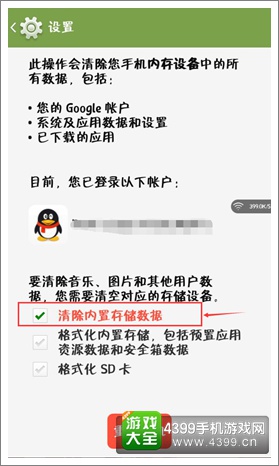
Note: Before restoring the factory settings, be sure to back up the important information in the device to avoid damage. Irreparable Loss! I hope everyone can use this method to succeed!
Related Recommendations:
Love Nikki-Dress UP Queen Tanabata activity Raiders pray for how to play Tanabata
Love Nikki-Dress UP Queen decomposition reconstruction game play decomposition decomposition how to play
More new version updates and the latest information 4399Love Nikki-Dress UP QueEn.
