Mobile Legends: Bang Bang team has kept improving the solutions for the connection problems. Now you have two options for connection:
Normal Mode(Default):
Consume less data usage but the network connection is not as stable as Speed Mode.
Speed Mode:
Make network connection more stable, prevent lag spikes but cost more data usage.
How to turn on/off the Speed ModeIn the home screen:
Open “Settings” on the top right, turn on/off “Speed Mode” in “Basics” – “Network Setting”.

In matches:
Open “Settings” on the top left, turn on/off “Speed Mode” in “Basics” – “Network Setting”.
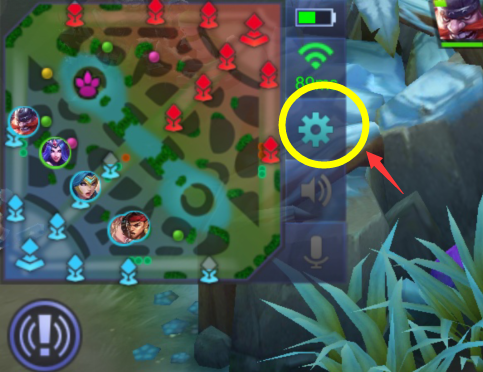
Speed Mode takes in effect immediately the moment you turn it on and will keep in effect until you switch it off manually.
When should I turn on the Speed Mode?
If you often meet lag spikes or lags under green ping. we suggest you turn on the Speed Mode.
Can I keep playing under the Normal Mode?
Of course. If you play smoothly under the Normal Mode, you’d better keep using it because it will save a lot of data usage.
When should I turn off the Speed Mode?
Some network operators don’t support Speed Mode. If you meet heavy lags under the Speed Mode, we suggest you turn off the Speed Mode because in that situation the Normal Mode is better.
The Mobile Legends: Bang Bang team keeps improving the Speed Mode. If it makes your connection better, please tell us that will make the developers more confident. If it doesn’t work or make your connection worse, we need your suggestion, too. Thanks for your understanding and support!
_-_-_-_-_-_-_-_-_-_-_-_-_-_-_-_-_-_-
Game Guide for Mobile Legends – moonton