Track your distance traveled, earn Buddy Candy, and hatch Eggs while your phone is in your pocket Adventure Sync is an optional mode that will allow you to record your kilometers traveled even when the Pokémon GO app isn’t open. You’ll be able to stay active and earn Buddy Candy or hatch Eggs without significantly impacting your device’s battery life. When your Buddy Pokémon has found Candy or when an Egg is about to hatch, you can enable to receive a push notification. As an added bonus, you’ll get weekly fitness reports to track your progress as well as earn rewards for reaching weekly milestones. Note: Adventure Sync is only available for Trainer Levels 5 and above
How to activate Adventure Sync
 To use this feature, you’ll have to always enable location permissions and connect to either Apple Health or Google Fit.
 button.
 To disable Adventure Sync, just revisit the settings page and uncheck Adventure Sync.
Weekly Fitness Report
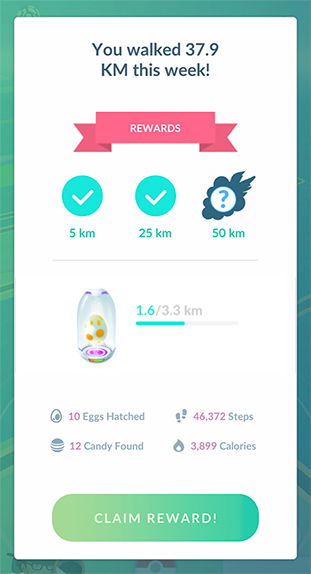 With Adventure Sync activated, you’ll also gain extra insights into your fitness progress. Every week, you will receive a fitness report to see your activity statistics and make progress towards earning bonus items when you reach your weekly goals. You can also view your current stats by navigating to your Trainer Profile.
If you play multiple Niantic titles with Adventure Sync enabled:
As long as your accounts share a login method, your distance traveled will match across the games. Even if you play on multiple devices, your distance will not get double-counted or overwritten. If there’s a discrepancy between the Adventure Sync distance reported from different games, you’ll get credit for the highest distance. For instance, if you have both Pokémon GO and Harry Potter: Wizards Unite installed and Pokémon GO tracks a higher distance than Harry Potter: Wizards Unite, Harry Potter: Wizards Unite will credit you with your distance from Pokémon GO.
Having Adventure Sync Issues?
Check out our Troubleshooting Adventure Sync article.
_-_-_-_-_-_-_-_-_-_-_-_-_-_-_-_-_-_-
Pokémon GO Game GUIDE