Pokémon GO Plus and Poké Ball Plus are optional accessories to enhance gameplay. Using a Bluetooth connection, they notify you of nearby Pokémon and PokéStops without having to look at your phone. As long as they’re connected, they will also count your steps so you can hatch Eggs and get Candy for your Buddy Pokémon.
This article covers the functionality of both the Pokémon GO Plus and Poké Ball Plus. For the sake of clarity, the instructions in this article refer to the Pokémon GO Plus, but they are also applicable to the Poké Ball Plus.
Visit The Pokémon Company’s website for more information about the
Poké Ball Plus and the
Pokémon GO Plus.
Quick Start Guide
When a Pokémon is nearby, the indicator light on the Pokémon GO Plus will blink and vibrate.
Green for Pokémon you’ve caught

Yellow for Pokémon you haven’t caught

Press the button to catch it!
After you press the button, you’ll see…Multicolor for success

Red for Pokémon has run away

When you’re within range of a PokéStop, the indicator light will flash
blue and vibrate.

Press the function button to search the PokéStop for items.The light will pulse multicolor for success and red for out of range
Pairing and connecting
Open the Pokémon GO app
In Map View, touch the
Main Menu

At the top right, touch
Settings

Touch
Pokémon GO Plus
Press the function button to make the accessory discoverable
Touch your Pokémon GO Plus under
Available Devices list. The accessory will vibrate when connected
Walking, collecting Items, and catching Pokémon
Walking with your Pokémon GO Plus:
When your Pokémon Go Plus is connected, even if you turn off your phone’s display, the distance you walk will make progress towards hatching Eggs and gaining Candy with your buddy Pokémon.Visiting PokéStopsOnce your Pokémon GO Plus is connected, the accessory will alert you to nearby PokéStops as you walk around.
When you’re within range of a PokéStop, the indicator light will flash
blue and vibrate.

To search the nearby PokéStop, touch the function button on the Pokémon GO Plus.
If you’re successful, the indicator light will flash in
multiple colors to indicate that you have found items. You may open the Journal to see what you found.

If your Item storage is full, the Pokémon GO Plus will pulse
white to indicate that you didn’t gain any items.

If you have moved out of range of the PokéStop, the Pokémon GO Plus will pulse
red to indicate that you didn’t gain any items.

Catching Pokémon
When a Pokémon is nearby, the indicator light on the Pokémon GO Plus will flash green and vibrate.When a Pokémon you haven’t previously caught is nearby, the indicator light on the Pokémon GO Plus will flash yellow and vibrate.
To try to catch the nearby Pokémon, touch the function button on the Pokémon GO Plus. The accessory will pulse and vibrate while the Pokémon is in the Poké Ball. The Pokémon will either stay in or break free.
If the Pokémon runs away the Pokémon GO Plus will pulse red 3 times. You may open the Journal to see which Pokémon escaped.
If you successfully catch the Pokémon, the Pokémon GO Plus will flash in multiple colors. You may open the Journal to see which Pokémon you caught.
Viewing activity
If you are using your Pokémon GO Plus while Pokémon GO is running in the background on your Android or iOS device, or your device’s screen is asleep, you will get notifications on your device showing you the results of your Pokémon GO Plus activity.
You can also view your activity catching Pokémon and visiting PokéStops in the Journal.
To view the Journal:
In Map View, touch the
Trainer Profile icon
Open the
Menu

Touch
Journal
The Journal displays your last 50 actions.
Reconnecting Pokémon GO Plus
Periodically, your Pokémon GO Plus may lose connection from your device. Reconnect the accessory to continue to catch Pokémon and visit PokéStops.
To reconnect:
-
In Map View, touch the
Pokémon GO Plus icon

The icon will illuminate and the Pokémon GO Plus will vibrate when reconnected.
If you do not see the Pokémon GO Plus icon in Map View, you may need to reconnect the accessory via the Settings menu (Main Menu > Settings > Pokémon GO Plus).
Indicator light notifications
Your Pokémon GO Plus will flash and vibrate to notify you of nearby Pokémon and PokéStops, even if you turn off your phone’s display. In the Pokémon GO Plus settings menu, you can disable notifications for nearby Pokémon, PokéStops, or both. If you disable both notifications, your accessory will not alert you to nearby Pokémon or PokéStops but it will still track your distance walked towards hatching Eggs and gaining Candy with your buddy Pokémon.
Indicator light and vibration key
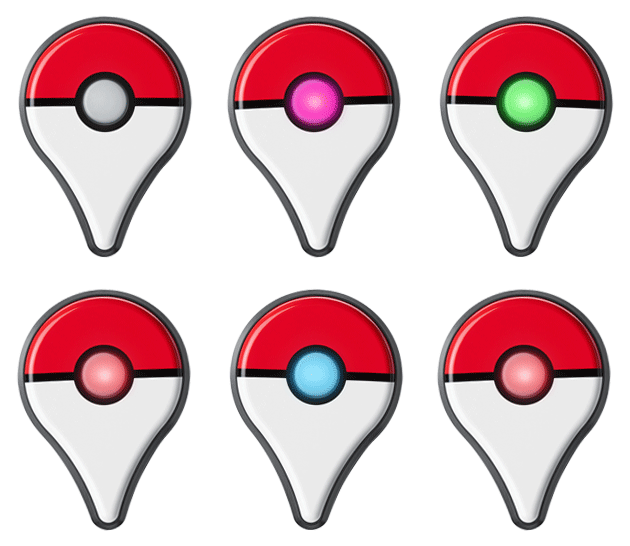
Green flash and vibration
When a Pokémon is nearby, the indicator light on the Pokémon GO Plus will flash green and vibrate. Press the function button to attempt to catch it.

Yellow flash and vibration
When a Pokémon you haven’t caught before is nearby, the indicator light on the Pokémon GO Plus will vibrate and flash yellow. Press the function button to attempt to catch it.

Blue flash and vibration
When you’re within range of a PokéStop, the indicator light will flash blue and vibrate. Press the function button to search the PokéStop for items. Upon receiving items, the indicator light will flash multiple colors and vibrate.
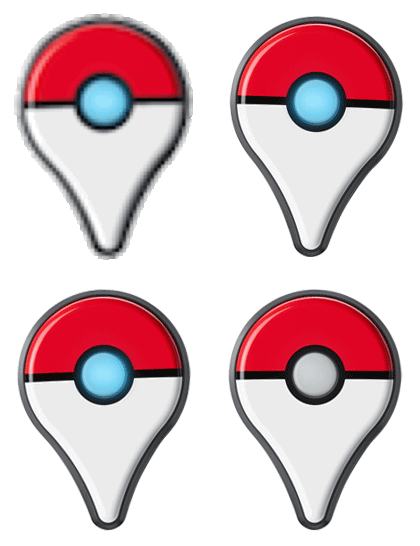
White pulse and vibration while attempting to catch a Pokémon
The Pokémon is in the Poké Ball. The Pokémon will either stay in or break free.

White pulse and vibration after visiting a PokéStop
You cannot gain any items from the PokéStop because your Item storage is full.

Multicolored pulse and vibration
When attempting to catch a Pokémon or visit a PokéStop, the indicator light will flash multiple colors and vibrate after successfully catching a Pokémon or visiting a PokéStop. Red pulse and vibration after attempting to catch a PokémonThe indicator light will pulse red 3 times when a wild Pokémon runs away.
Blue flash and no vibration
The accessory is paired to a device but not connected.
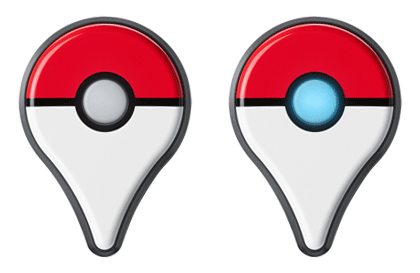
White flash and no vibration
The accessory is not paired to a device.

Vibration and no light after pressing the function button
The accessory is paired and connected to a device.

Solid Red and vibration
The indicator light is solid red to alert you to issues using your accessory. You may have moved out of range of the Pokémon or PokéStop, Pokémon storage may be full, or you may be out of Poké Balls.

_-_-_-_-_-_-_-_-_-_-_-_-_-_-_-_-_-_-
Pokémon GO Game GUIDE