In the course of your efforts to contain the Calamity, you’re sure to encounter other witches and wizards of the Statute of Secrecy Task Force. Become friends with them to receive benefits such as bonus Wizarding XP and Wizarding Challenge XP when you engage in Wizarding Challenges together.Note: For users with child accounts through Niantic Kids, this feature is disabled by default. Parents must enable this feature for their child in the Niantic Kids Parent Portal.
Adding and Removing Friends
Each player has a unique 12-digit Friend Code. From the Friend List page, tap the “Add Friend” button to view your 12-digit Friend Code. Share this code with other witches and wizards or enter another player’s Friend Code to send them a Friend Request.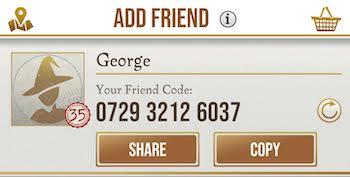 If you would like to change your Friend Code, tap on the refresh button to update the code.
Adding a Friend
Friend Requests will appear in your Friend List. You can add up to 200 friends to your Friend List. Once you reach this limit, the option to add a friend will become grayed out. You’ll need to remove some Friends before you can send Friend Requests again and add new ones. 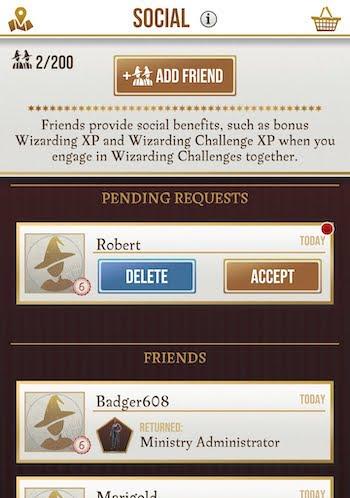 Once you become friends with another player, specific account information from your Ministry ID will be shared with your friend through their Friend List. See what information you share with your friends.
Adding Facebook Friends
You can also add friends from Facebook who’ve installed the Harry Potter: Wizards Unite app. Note: Your Wizards Unite account must be linked to Facebook in order to access Facebook Friends. Visit the Help Center to learn more about linking another login provider.
Note: Niantic won’t have access to a list of all your Facebook friends. We will only have access to a Friend List consisting of Facebook friends who have already downloaded Harry Potter: Wizards Unite and have also chosen to import Facebook Friends to the app. When a Facebook friend imports their data into Harry Potter: Wizards Unite, your Facebook profile name and photo will be used along with your Code Name so Friends can recognize you. You can always change your mind and remove a friend from your Friends list at any time or edit your app permissions from Facebook’s Settings menu.Players can view and accept or deny Friend Requests through their Friends List. If they accept your request, you will become friends with one another and you’ll be able to see information from their Ministry ID and other game-specific information through your Friend List. You won’t see their Facebook profile picture or any other information from their Facebook profile on your Friends List. If they don’t respond, your Friend Request will expire after 7 days.
Removing a Friend:
If you decide that you no longer want your friend to see your Friend Info, you can remove them from your Friend List by unfriending them at any time.
- At the bottom of their Friend Info profile, tap the “Remove Friend” button.
Wizarding Challenges with Friends
Wizarding Challenges are collaborative pursuits where you and other wizards can battle against Foes to earn rewards. You can play them solo – but for a better chance at defeating the Foes – you can battle with up to 4 friends. When you play with friends, you will earn bonus Wizarding XP and Wizarding Challenge XP in addition to the rewards you get for participating in Wizarding Challenges with other players. Entering the LobbyYou and your friends can join a lobby by entering the same Chamber before the lobby timer runs out or 5 players join. A yellow Friend icon on the Chamber room indicates a Chamber where your friends are waiting in a lobby for the Wizarding Challenge to begin.Tip: Your odds of being teamed up with your friends are greater when you and your friends join the Chamber lobby within seconds of each other.
_-_-_-_-_-_-_-_-_-_-_-_-_-_-_-_-_-_-
Harry Potter: Wizards Unite Game GUIDE
哈利波特:巫師聯盟