Hardware Acceleration (GPU Rendering) is a feature introduced in some browsers to improve performance. Due to hardware or software compatibility issues, you have to check whether the feature should be enabled or disabled with certain websites.
1. Open Mozilla Firefox.
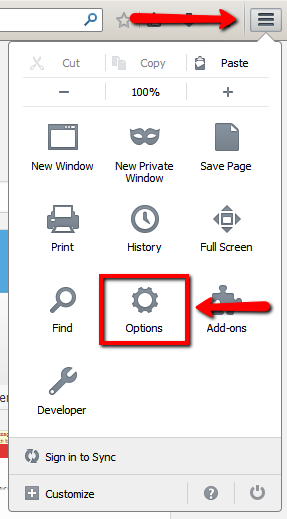
2. On the top right corner of your browser, click the
‘Menu’ button.
3. Choose
‘Options’.
4. Choose
‘Advanced’ tab.
5. Under
‘Advanced’ tab, choose
‘General’.
6. To enable,
tick the checkbox beside
‘Use hardware acceleration when available’.
7. To disable, make sure the checkbox beside
‘Use hardware acceleration when available’ is
unchecked.

8. Restart Mozilla Firefox.
_-_-_-_-_-_-_-_-_-_-_-_-_-_-_-_-_-_-
FarmVille 2: Country Escape Game GUIDE
哈利波特:巫師聯盟