Google Chrome users who are having issues with their Request Envelope can find out if their browser is blocking third-party cookies and site data by doing the following:
1.) Type
chrome://settings/content into the address bar and press
Enter to open your browser’s content settings.

2.) Remove the check on the box next to
Block third-party cookies and site data located under the
Cookies header.
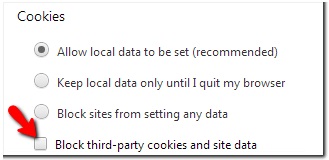
3.) Click
Done and reload FarmVille.

_-_-_-_-_-_-_-_-_-_-_-_-_-_-_-_-_-_-
FarmVille 2: Country Escape Game GUIDE
哈利波特:巫師聯盟