There are several concerns that require uninstalling and reinstalling FarmVille to be fixed. We prepared a step by step process on how to do it. The details below will also explain certain changes on settings of the app in Facebook. Instructions to uninstall the game: Option 1: Uninstall via Settings 1. Click the drop-down icon and select Settings. 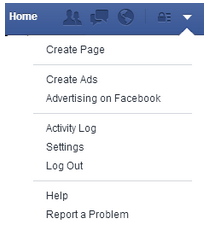 2. Select the Apps from General panel.
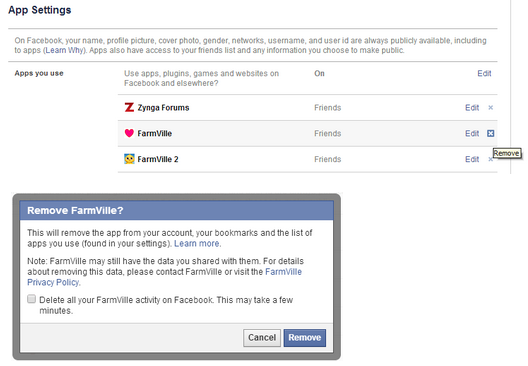
 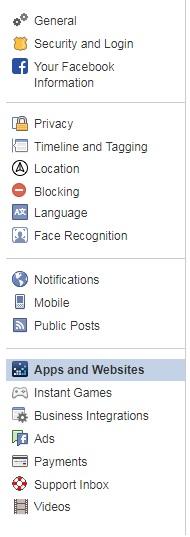 3. “ X” out FarmVille to remove App. Do not worry as this will not delete the account’s game progress.
  Option 2: Uninstall via Timeline 1. Go to the Timeline by clicking on the Profile picture.
 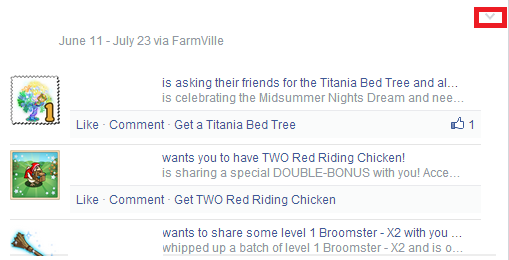 2. " Remove FarmVille" to uninstall the game.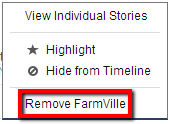
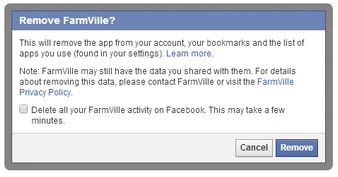 Instructions to reinstall the game: Option 1: Reinstall via Search Search FarmVille. Click on Play Now.
  Option 2: Reinstall via FarmVille page. Go to https://www.facebook.com/FarmVille and click on Play Now. IMPORTANT: Players with an active subscription get this dialogue box which states that their subscription will be canceled when they attempt to uninstall FarmVille.
 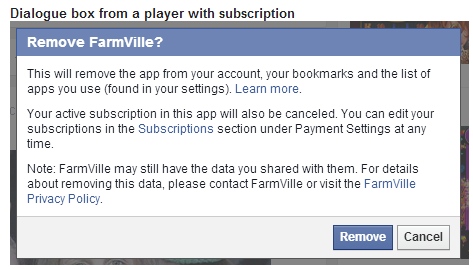 For VIP Subscription, remember that:
- Your subscription will not be automatically canceled.
- You will still get the remaining Farm Cash credit from your subscription, but you will not be automatically renewed the next month.
- You may renew your subscription once canceled via the VIP tab or VIP Membership icon in the game to retain your tier
_-_-_-_-_-_-_-_-_-_-_-_-_-_-_-_-_-_-
FarmVille 2: Country Escape Game GUIDE
哈利波特:巫師聯盟