You will be assigned a default general name (e.g. General #12345) when you start the game. Once you connect to Facebook, Game Center (iOS), or Google Play (Android), you will be able to personalize your name.
To connect to your game to any of these three, tap the
Settings (gear) icon, then tap the "
CONNECT" button under "Facebook", "Game Center", or "Google Play".
Tap the Settings icon

On an iOS Device

On an
Android device

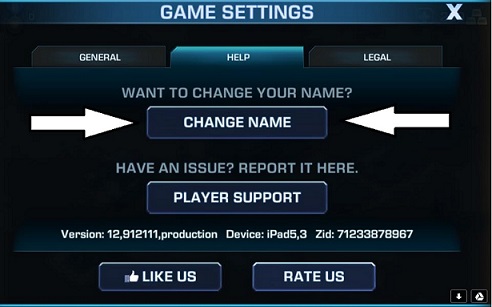
In case you have already assigned a name to your game account and you wish to change it, Name Change option is now available in the game and it is no longer a one-time feature! All you need to do is update your game to the latest version, then go to Settings > Help > Name Change.Note: Please avoid adding slash sign (/) to your name as it may result to an in-game issue.

FAQ:
Q: Can I use color in my name?
A: Adding Color to your name will use up characters in which there is a limit. as of 3/9/2016 You are ONLY allowed to use "color coding" if it fits in the current Character limit. There will be no exceptions. Players who have already obtained a name which exceeded the character limit are considered "grandfathered" in.
_-_-_-_-_-_-_-_-_-_-_-_-_-_-_-_-_-_-
Empires & Allies Game GUIDE