Hardware Acceleration (GPU Rendering) is a feature introduced in some browsers to improve performance. Due to hardware or software compatibility issues, you have to check whether the feature should be enabled or disabled with certain websites.1. Open Google Chrome.2. On the top right corner of your browser, click the ‘Menu’ button.3. Choose ‘Settings’. 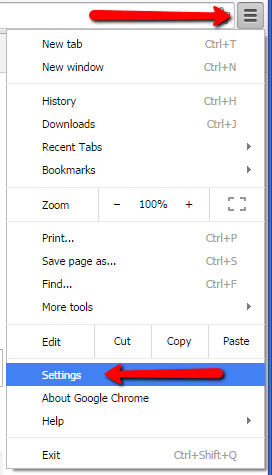 4. At the bottom part of the page, click ‘Advanced’
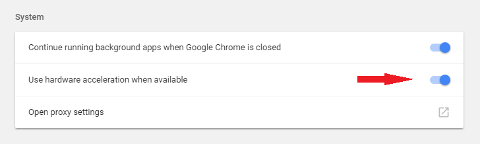
 5. Scroll down to the bottom of the page and look for ‘System’.6. To enable or disable hardware acceleration, toggle on/off the ‘Use hardware acceleration when available’ option.
 7. Restart Google Chrome.
_-_-_-_-_-_-_-_-_-_-_-_-_-_-_-_-_-_-
FarmVille Game GUIDE