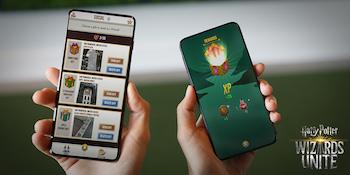
 One reason to connect with friends is the ability to send and receive Gifts. Gifts contain an assortment of useful items you can send to friends on your Friends List. While you’re out exploring, you’ll occasionally find Gifts by dining at Inns, gathering ingredients at Greenhouses, or playing Wizarding Challenges. While you can’t open Gifts you collect yourself, you can send those Gifts to friends and open Gifts that friends send to you.
Collecting Gifts
Gift boxes have unique colors, and each color corresponds to the type of item inside the Gift. You will receive Wizard XP whenever you open Gifts and in some cases, Gifts may also contain a bonus item, like a Foundable fragment.
- Blue Gifts contain Spell Energy. Acquire Blue Gifts while dining at Inns.
- Green Gifts contain Ingredients. Acquire Green Gifts while gathering Ingredients at Greenhouses.
- Yellow Gifts contain Runestones. Acquire Yellow Gifts when you play a Wizarding Challenge.
Every Gift will include the name and picture of the place where it was initially collected. The Gift’s location will be shared with your friend when they receive the Gift.You can collect up to 100 Gifts per day, and your Gift inventory can hold up to 30 Gifts. If you reach the inventory cap, you can send Gifts to friends and continue collecting until you’ve collected a total of 100 Gifts that day. Send Gifts to your friends every day so you can collect and send more!
Sending a Gift
You can send each of your friends 1 Gift per day. If your friend hasn’t opened a Gift you previously sent them, then you won’t be able to send them another Gift until they open the first one.To send a Gift to a friend:
Your friend will receive an in-game notification that you sent them a Gift.Note: You can also send Gifts through the Gift Inventory by tapping a Gift to send, then selecting a friend from the Friends List.
Opening a Gift
Although you can receive Gifts from your friends every day, up to 10 Gifts can be opened every 24 hours. The Gift counter located near the top of your Friends List counts the remaining Gifts you have left to open. The reset timer shows the time remaining until the Gift counter resets.
_-_-_-_-_-_-_-_-_-_-_-_-_-_-_-_-_-_-
Harry Potter: Wizards Unite Game GUIDE
哈利波特:巫師聯盟