Your online status lets your friends know when you are available for Trainer Battles or to meet up for Raid Battles. When you set yourself online, you can also see any of your friends who’ve also set themselves online. While online, you’ll see a green dot next to your Trainer Profile image on the Map View, above your Friend List when looking at your Trainer Profile, and at the top of your Friend List.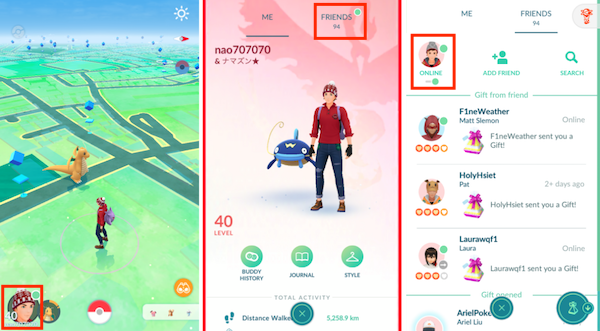
How do I control my online status?
You can change your online status from your Friend List. Just tap the image of your Trainer to toggle between online and offline. Your online status will display to your friends who have also set themselves online.Please note that, if you are playing multiple Niantic games on the same device, your online status is only reflected in the game that you are actively playing.
Niantic Kids and Online Status
If you are the parent or guardian of a Trainer who uses a Niantic Kids or Pokémon Trainer Club account to access Pokémon GO, enabling the “Friends & Related Features” permission in the Parent Portal will also grant access to online status. Trainers using child accounts with the online status feature enabled can toggle their status from their Friend List, just like Trainers with a standard account.Parents and guardians can also disable the online status feature altogether by disabling the “Friends & Related Features” permission. Please note that disabling this permission in the Parent Portal will permanently remove all friends from the account’s Friend List.
_-_-_-_-_-_-_-_-_-_-_-_-_-_-_-_-_-_-
Pokémon GO Game GUIDE